
This guide explains what Odoo ERP software development actually involves, when businesses need it, what the most common development services look like in practice, and how to choose the right Odoo development partner for your project.
What Are Odoo ERP Development Services?
Odoo ERP development services refer to the full spectrum of technical work that goes beyond standard Odoo configuration — the work that transforms a generic ERP platform into a system precisely engineered for the way your business operates.
This includes building brand-new modules that Odoo doesn't offer natively, modifying existing modules to match your specific workflows, integrating Odoo with external platforms via APIs, automating complex business processes, and developing custom reports, dashboards, or portals tailored to your team's needs.
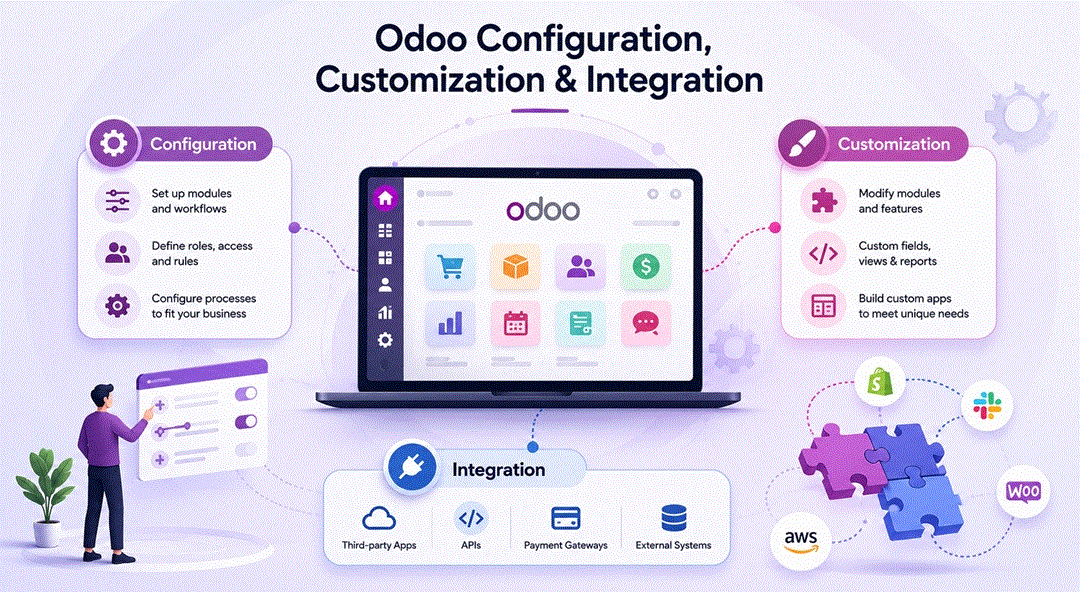
Configuration — Setting up Odoo using built-in settings, without writing code. Choosing your chart of accounts, defining your sales stages, setting up email templates. Any trained functional consultant can do this.
Customization — Modifying Odoo's behavior through code. Extending existing models, overriding standard views, adding business logic, building custom workflows. This is the domain of Odoo ERP development.
Integration — Connecting Odoo to other systems (payment gateways, logistics platforms, CRMs, e-commerce platforms, IoT devices) via APIs and middleware. This is a specialized subset of development that requires both Odoo expertise and knowledge of the external system's API.
Professional Odoo ERP development services cover all three layers — and the best development partners will help you understand which approach (configuration vs. customization vs. integration) is the right tool for each business requirement, rather than defaulting to custom code when simpler solutions exist.
When Businesses Need Odoo ERP Customization
Not every Odoo implementation requires development work. Many businesses — especially smaller ones with relatively standard workflows — can get excellent results from a well-configured standard Odoo installation. So how do you know when it's time to bring in Odoo ERP development expertise?
Your Industry Has Non-Standard Processes
Certain industries operate with workflows that generic ERP software simply wasn't designed for. A construction company needs to manage project-based costing, subcontractor billing, and progress claims in ways that don't map to standard manufacturing or service workflows. A pharmaceutical distributor needs full lot traceability, expiry date management, and regulatory documentation that goes well beyond Odoo's standard inventory module. A legal firm needs matter management, trust accounting, and court deadline tracking that no off-the-shelf ERP handles natively.
In these cases, custom Odoo ERP software development isn't optional — it's the only way to make the platform genuinely usable for your business.
You Have Proprietary or Legacy Systems That Must Be Retained
Most businesses that implement Odoo don't operate in a greenfield environment. They have existing systems — a custom-built CRM, a proprietary quoting tool, a legacy warehouse management system, a third-party logistics platform — that aren't going away overnight. Integrating these systems with Odoo requires dedicated Odoo ERP development work to build the data pipelines, API connections, and synchronization logic that keeps everything in sync.
Your Workflows Are More Complex Than Standard
Sometimes it's not about industry specificity — it's about operational complexity. A business with a multi-level approval workflow for purchase orders (department manager → finance controller → CFO, with different thresholds for each level) needs code to implement that logic. A company that operates in multiple countries with different tax rules, currencies, and regulatory requirements needs localization customization beyond what Odoo's standard multi-company setup provides.
You Need Custom Reporting or BI
Odoo's built-in reporting is solid but finite. If your management team or board needs financial reports in a specific format, operational dashboards that combine data across modules in non-standard ways, or automated scheduled reports delivered to executives' inboxes each Monday morning, Odoo ERP software development is the path to get there.
Standard Odoo UX Doesn't Match Your Team's Reality
User adoption is one of the biggest risk factors in any ERP implementation. If the standard Odoo interface forces your team through unnecessary steps, hides information they need at a glance, or doesn't match the mental model of how they think about their work, adoption suffers. Custom views, simplified interfaces for specific user roles, and mobile-optimized screens are all legitimate Odoo ERP development investments that pay for themselves through higher adoption and reduced training time.
Custom Module Development
Custom module development is the cornerstone of Odoo ERP development services. It's how developers extend the Odoo platform to handle business requirements that don't exist in the standard application library.
What Is a Custom Odoo Module?
In Odoo's technical architecture, everything is a module — even the core applications like Sales, Accounting, and Inventory. A custom module is simply a packaged set of Python code, XML view definitions, data files, and business logic that adds new functionality or modifies existing behavior within the Odoo framework.
Custom modules follow Odoo's established development conventions, which means they integrate cleanly with the rest of the platform, benefit from Odoo's built-in ORM (Object-Relational Mapping), and can be upgraded when new Odoo versions are released.
Common Types of Custom Module Development
New Business Objects
When your business needs to track something Odoo doesn't natively model — say, a "Loan Agreement" in a financial services firm, a "Site Survey" in a construction company, or a "Clinical Trial" in a biotech — developers build new models with their own fields, views, workflows, and access controls. These new objects integrate seamlessly with existing Odoo modules, so a Site Survey can be linked to a Project, trigger a Purchase Order, and generate an Invoice without any manual data entry.
Extending Existing Models
Rather than building from scratch, many Odoo ERP development projects involve extending existing Odoo models with new fields, logic, or behaviors. Adding a custom approval step to the Sales Order workflow, creating a new field on the Product that links to a regulatory database, or modifying the invoice printing logic to match a specific client's required format — all of these are module extension projects.
Custom Wizards and Actions
Wizards are interactive dialogs that guide users through complex multi-step operations. A custom wizard might walk a warehouse manager through a complex stock adjustment process, or help an accountant run a specific period-end closing procedure, enforcing the right sequence of steps and validations along the way.
Industry-Specific Modules
The most sophisticated custom module development projects are essentially mini-applications built on top of the Odoo framework — complete with their own menus, views, access control rules, automated actions, and reporting. For businesses in specialized industries, these bespoke modules can represent a significant competitive advantage, encoding years of operational best practice into a system that enforces consistency and efficiency across the organization.
The Custom Module Development Process
Professional Odoo ERP software development follows a structured methodology:
- Requirements Discovery — Detailed workshops with business stakeholders to document current processes, pain points, and desired future-state workflows.
- Technical Specification — A formal spec document defining exactly what the module will do, what data models it will create or extend, what the UI will look like, and what business logic it will enforce.
- Development and Unit Testing — Developers build the module in a development environment, writing code and unit tests iteratively.
- UAT (User Acceptance Testing) — Business users test the module in a staging environment against real-world scenarios before go-live.
- Deployment and Training — The module is deployed to production, users are trained, and post-go-live support is provided.
Odoo Integrations
Modern businesses don't run on a single platform — and no ERP, however comprehensive, will ever replace every specialized tool a business uses. Odoo ERP development services routinely include building integrations between Odoo and the external platforms businesses depend on.
E-Commerce Integrations
For retailers and B2B companies selling online, connecting Odoo to their e-commerce platform is essential. Odoo has a native e-commerce module, but many businesses already have significant investment in Shopify, WooCommerce, Magento, or a custom storefront. Integration development synchronizes products and prices from Odoo to the storefront, pulls orders from the storefront into Odoo for fulfillment, and syncs inventory levels in real time to prevent overselling.
Payment Gateway Integrations
Processing payments through Odoo requires connecting it to payment processors — Stripe, PayPal, Authorize.net, or regional payment gateways. While Odoo has native connectors for some of the most popular processors, businesses operating in specific geographies or using enterprise payment platforms often need custom integration work to handle the full payment lifecycle: authorization, capture, refunds, and reconciliation.
Logistics and Shipping Integrations
Companies that rely on third-party logistics (3PL) providers, carrier APIs (FedEx, UPS, DHL), or freight management platforms need these systems to talk to Odoo's inventory and delivery modules. Well-built shipping integrations automatically generate shipping labels, update delivery tracking numbers on sales orders, and trigger customer notifications — without anyone manually keying data between systems.
CRM and Marketing Platform Integrations
Some businesses have large, mature Salesforce or HubSpot installations with years of pipeline data, custom fields, and established sales team workflows. Rather than forcing a wholesale migration to Odoo CRM, integration development can sync key data between the two systems — leads, opportunities, contacts, deal stages — so sales teams keep their familiar tools while finance and operations work in Odoo.
ERP-to-ERP and Legacy System Integrations
Companies that are partially migrating to Odoo — running it alongside an existing ERP during a phased transition, or maintaining a legacy system for a specific business unit — need robust data synchronization between systems. This type of integration is technically complex, requiring careful handling of data conflicts, duplicate prevention, and error recovery.
IoT and Hardware Integrations
For manufacturers and warehouses, Odoo's IoT Box framework enables integration with physical hardware — barcode scanners, weighing scales, label printers, CNC machines, and production line sensors. Custom Odoo ERP development in this space can create real-time feedback loops between shop floor equipment and Odoo's manufacturing module, enabling automated production tracking, quality measurements, and predictive maintenance alerts.
Workflow Automation
If there's a single area where Odoo ERP development delivers outsized return on investment, it's workflow automation. Every manual, repetitive step in a business process is an opportunity for error, delay, and wasted labor. Well-designed automation eliminates those steps entirely.
What Can Be Automated in Odoo?
Odoo provides a built-in automation framework — Automated Actions — that allows certain triggers and actions to be configured without code. But the real power comes when developers build custom automation logic that goes beyond what the standard framework supports.
Document Lifecycle Automation
Sales orders, purchase orders, invoices, and manufacturing orders all go through lifecycles — draft, confirmed, in progress, closed. Custom automation can enforce business rules at each transition: preventing a sales order from being confirmed without a credit check, automatically generating a purchase order when a manufacturing order is confirmed and stock is insufficient, or placing an invoice on hold if a customer's account is overdue.
Multi-Step Approval Workflows
Standard Odoo supports simple single-level approvals. Many businesses need conditional, multi-level approval chains — where the required approvers change based on the transaction value, the department, the vendor, or the product category. Custom Odoo ERP development builds these logic trees into the system, with notifications, escalations, and audit trails.
Scheduled Automation and Batch Processing
Automated jobs that run on a schedule — nightly inventory valuations, weekly aged debt reports emailed to the credit control team, monthly payroll processing triggers — are implemented through Odoo's scheduled actions framework, extended with custom code where the standard functionality falls short.
Cross-Module Automation
Some of the most valuable automations span multiple Odoo modules. When a field service job is marked complete, automatically create the customer invoice, update the project timesheet, replenish the used spare parts, and send a customer satisfaction survey — all without a single manual step. Building this kind of end-to-end automation requires deep knowledge of the Odoo framework and careful design to handle edge cases and exceptions gracefully.
Notification and Escalation Workflows
Keeping the right people informed at the right time is a constant operational challenge. Custom automation can send targeted notifications via email, SMS, or Odoo's internal messaging system when specific conditions are met — a high-value deal moves to a new stage, a delivery is running late, a payment is overdue by more than 30 days, or a production line quality check fails.
API Development
Odoo ERP software development increasingly means API development. As businesses build more connected technology ecosystems — combining best-of-breed SaaS tools, internal applications, customer portals, and partner platforms — Odoo's ability to expose and consume APIs becomes critical.
Odoo's Native API Capabilities
Odoo ships with a built-in XML-RPC and JSON-RPC API that exposes its full data model to external systems. This means any external application can — with the right authentication — read, create, update, and delete records in Odoo programmatically. For many standard integration use cases, this native API is sufficient.
However, the native API is a low-level, generic interface. It exposes Odoo's data model directly, which means external developers need to understand Odoo's internal data structures to use it effectively. It also doesn't enforce business logic — an external system using the raw API can bypass validations that the Odoo UI enforces.
Custom REST API Development
For organizations building customer-facing portals, mobile applications, or connecting Odoo to modern SaaS platforms, professional Odoo ERP development services often include building a custom REST API layer on top of Odoo.
A custom REST API can:
- Expose clean, purpose-built endpoints that abstract away Odoo's internal complexity
- Enforce business logic and validations on all inbound data
- Return data in formats tailored to the consuming application's needs
- Implement proper authentication and rate limiting
- Support webhooks to push real-time notifications to external systems when events occur in Odoo
Webhooks and Event-Driven Architecture
Modern integrations increasingly rely on event-driven architecture — rather than one system polling another for updates, systems emit events when something happens and subscribers react in real time. Odoo can be configured to emit webhooks on key events (order confirmed, invoice paid, shipment dispatched), enabling real-time data flow to connected systems without constant polling.
API Security and Authentication
Any Odoo ERP development project involving APIs must take security seriously. Proper implementation includes OAuth 2.0 or API key authentication, role-based access control that ensures external systems can only access the data they're authorized to see, comprehensive logging of all API activity, and rate limiting to prevent abuse.
Choosing an Odoo ERP Development Partner
The success of your Odoo ERP development project depends as much on the partner you choose as it does on the platform itself. The Odoo partner ecosystem is large — thousands of companies worldwide offer Odoo services — and quality varies considerably. Here's how to evaluate and select the right development partner for your needs.
Look for Certified Odoo Expertise
Odoo maintains an official partner program with Gold, Silver, and Learning tiers. Gold and Silver partners have been evaluated by Odoo on their technical expertise, customer success track record, and number of certified developers on staff. While certification isn't a guarantee of quality, it's a meaningful signal that a firm has invested in proper Odoo training and has demonstrated competency to Odoo's own standards.
Beyond partner certification, look for individual developers who hold Odoo certifications — the Odoo Functional Certification and Odoo Technical Certification are the most relevant credentials for development projects.
Assess Industry Experience
Odoo ERP development isn't a commodity skill. A firm that has spent five years building custom modules for manufacturing clients will bring a fundamentally different depth of insight to a manufacturing project than a generalist web development shop that picked up Odoo last year. When evaluating partners, ask specifically about their experience in your industry. Request case studies. Talk to reference customers in similar sectors.
Evaluate Their Development Methodology
Professional Odoo ERP software development should follow established software development best practices — not be a series of ad-hoc customizations bolted onto your system. Ask prospective partners about their development process: Do they write technical specifications before writing code? Do they use version control (Git)? Do they maintain separate development, staging, and production environments? Do they write unit tests? Do they document their customizations?
The answers to these questions will tell you a lot about the long-term maintainability of what they build for you.
Consider Long-Term Partnership, Not Just Project Delivery
Odoo releases a major new version every year. Custom modules and integrations need to be maintained and upgraded alongside the core platform. A development partner who disappears after the project goes live leaves you with a potential long-term liability. Choose a partner who offers ongoing maintenance contracts, has a clear upgrade methodology, and demonstrates a commitment to long-term client relationships.
Assess Communication and Project Management
Technical skill is necessary but not sufficient. The best Odoo ERP development projects succeed because the development team communicates clearly, manages expectations honestly, flags risks early, and involves business stakeholders at every key decision point. Evaluate a prospective partner's communication style and project management approach as carefully as their technical portfolio. A discovery call that feels disorganized, one-sided, or overly salesy is a warning sign worth heeding.
Understand the Pricing Model
Odoo ERP development services are typically priced in one of three ways: fixed price (agreed scope for agreed cost), time and materials (hourly rate, billed for actual time spent), or a retainer/managed service model (ongoing monthly engagement for a set number of hours or deliverables).
For well-defined, discrete projects with clear specifications, fixed-price engagements offer cost certainty. For complex, exploratory, or evolving projects, time and materials is often more appropriate — fixed-price bids on poorly defined scope tend to result in either cost overruns or corners being cut. For ongoing development and maintenance needs, a retainer model often provides the best value and the most responsive service.
Be cautious of partners who quote suspiciously low prices — Odoo ERP software development is skilled, specialized work, and rates that seem too good to be true usually reflect a compromise on quality, experience, or location that will cost you more in the long run.
Review Their Approach to Code Quality and Documentation
Custom Odoo code that no one else can understand is a business risk. When evaluating development partners, ask to see examples of their technical documentation, ask whether their code is maintained in a shared repository you'll have access to, and ask explicitly about their coding standards and code review process. Quality partners will welcome these questions; less professional ones will be evasive.
What to Expect from an Odoo ERP Development Engagement
If you've never commissioned Odoo ERP development before, knowing what a professional engagement looks like will help you evaluate proposals and set expectations with internal stakeholders.
A well-structured Odoo ERP software development project typically follows this arc:
Discovery and Scoping (2–4 weeks): Workshops with your team to document requirements, map current processes, and identify the gap between standard Odoo and your specific needs. Output is a detailed scope document and project plan.
Technical Design (1–2 weeks): The development team produces technical specifications for each development item — data models, UI wireframes, integration diagrams, automation logic. This is reviewed and signed off before development begins.
Iterative Development (4–16 weeks depending on scope): Development proceeds in sprints, with demo sessions at the end of each sprint so you can see progress and provide feedback. Changes in scope are documented and managed through a formal change request process.
Testing (2–4 weeks): Unit testing by developers, integration testing in a staging environment, and user acceptance testing by your team against agreed test scripts.
Go-Live and Hypercare (1–2 weeks): Deployment to production, final user training, and an intensive post-go-live support period to address any issues that surface in real-world use.
Ongoing Maintenance: Regular module updates to maintain compatibility with Odoo version upgrades, bug fixes, and incremental enhancements as your business evolves.
Final Thoughts
Odoo ERP development services exist because no two businesses are alike — and the gap between "good enough" and "perfectly fitted" is often where competitive advantage lives.
Whether you need a single custom module to handle a unique operational requirement, a complex integration with a mission-critical external system, an end-to-end workflow automation that eliminates hours of manual work each week, or a full custom API layer to power a customer-facing portal — the right Odoo ERP development partner can deliver it.
The key is choosing that partner carefully. Look for certified expertise, proven industry experience, disciplined development methodology, and a genuine commitment to long-term partnership. The Odoo ERP software development market has no shortage of options — but the best partners will treat your business problems as their own and build solutions engineered to last.